
Lotus365 customer support runs through a single WhatsApp channel staffed around the clock by trained agents who speak both Hindi and English. No ticket portals, no email queues, no chatbot loops — just a direct conversation with someone who can actually resolve your issue. Whether a deposit has not arrived, your account is locked, or you need help understanding how a bet was settled, the path to a fix starts with one WhatsApp message.
This page explains how the support system is structured, how to reach it, what each team handles, how quickly you can expect a response, which issues you can fix without contacting anyone, how escalation works when a first-level agent cannot resolve your problem, and what falls outside the scope of support entirely.
How Lotus365 Support Is Structured
The Lotus365 customer support operation is built around specialised teams rather than a single pool of generalists. When your message arrives, it is triaged and routed to the department best equipped to handle the specific type of issue you are facing. You reach someone with relevant expertise from the first interaction rather than explaining your problem to a generalist who then has to pass you along.
The WhatsApp-first model was chosen for a practical reason: it is the communication channel that over 500 million Indians already use daily. There is no new app to download, no support portal to bookmark, no ticket number to track. Your conversation history stays in your WhatsApp chat, making it easy to reference previous interactions.
Support operates continuously — twenty-four hours a day, seven days a week, including weekends and public holidays. Staffing levels are scaled up during high-traffic periods such as IPL match nights and major international cricket fixtures.
Contacting Support on WhatsApp
Reaching Lotus365 customer support takes less than a minute. The process is the same whether you are a new user with a pre-registration question or a long-time bettor dealing with a withdrawal delay.
- Open WhatsApp on your phone or use WhatsApp Web on desktop.
- Start a chat with the official support number displayed on the Lotus365 website. Tap the WhatsApp link directly or save the number to your contacts.
- Describe your issue in the first message. Include your username or registered mobile number so the agent can locate your account immediately.
- Receive an acknowledgment confirming your message has entered the queue. A live agent picks up shortly after.
- Work through the issue in real time. The agent investigates, takes action, and confirms resolution before closing the conversation.
Tips for Faster Resolution
- Mention your username in the first message — this is the single most effective way to speed things up.
- For payment issues — include the approximate amount, the time of the transaction, and the method used. Full details on available channels are on the payment methods page.
- For technical problems — a screenshot sent directly in the chat helps the agent diagnose the situation without back-and-forth clarifying questions.
- Do not start a new chat if your issue is unresolved — a follow-up in the existing thread brings your conversation back to the top without resetting your queue position.
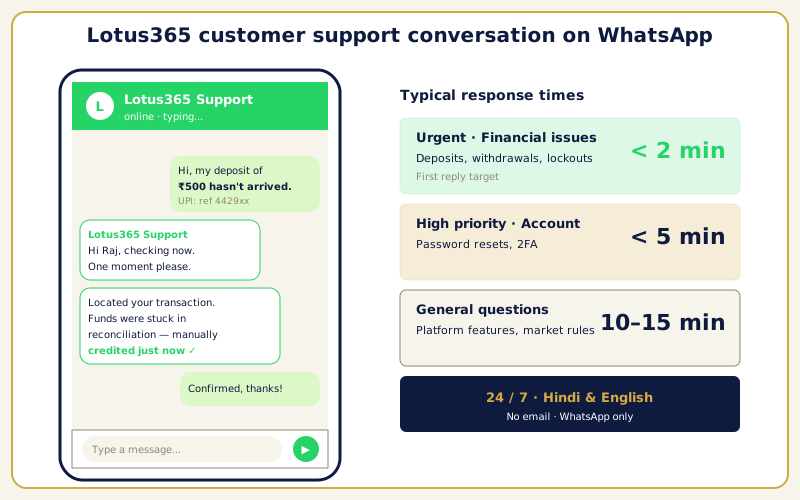
There is no separate email support channel. WhatsApp is the primary and preferred method for all assistance. <!– IMAGE: WhatsApp chat interface showing a support conversation with a Lotus365 agent | Alt: Lotus365 customer support conversation on WhatsApp –>
What Each Support Team Handles
Lotus365 customer support is divided into specialised departments, each focused on a specific category of issue.
- Financial team — Everything involving money movement. Deposit failures, pending withdrawals, payment method errors, UPI transaction mismatches, and bonus credit queries. Financial agents have direct access to transaction logs and can verify the status of any payment within the conversation.
- Account access team — Login failures, forgotten passwords, two-factor authentication issues, and account lockouts triggered by security protocols. These queries are treated as high-priority because they block you from using the platform. Details on the login process are available for self-service troubleshooting.
- Betting and markets team — Questions about odds, bet settlement, voided markets, and specific rules for cricket or other sports. These agents know the market mechanics and can walk you through any ruling.
- Technical team — App crashes, loading errors, display glitches, and feature malfunctions on the browser or APK. Technical agents can guide troubleshooting and escalate platform-side problems to the development team.
- Verification team — Document submissions for account verification, rejection reasons, and resubmission guidance. These agents know exactly what format and quality is required, reducing back-and-forth.
How Fast You Can Expect a Response
Lotus365 customer support maintains specific response time targets measured against daily operational benchmarks.
| Issue Type | First Response | Typical Resolution | Priority |
|---|---|---|---|
| Deposit not credited | Under 2 minutes | 5–15 minutes | Urgent |
| Withdrawal pending | Under 2 minutes | 10–30 minutes | Urgent |
| Account locked or login failed | Under 2 minutes | 5–20 minutes | Urgent |
| Password reset | Under 5 minutes | 5–10 minutes | High |
| Bet settlement query | Under 5 minutes | 10–30 minutes | High |
| App crash or technical bug | Under 5 minutes | 15–60 minutes | Medium |
| KYC document rejection | Under 10 minutes | 30–60 minutes | Medium |
| Bonus or promotion query | Under 10 minutes | 10–20 minutes | Standard |
| General platform question | Under 10 minutes | 5–15 minutes | Standard |
| Feature request or feedback | Under 15 minutes | Acknowledged same day | Low |
Urgent financial and access issues hold their under-two-minute first response target even during peak event periods. Standard queries may see slightly extended response times when the IPL is in full swing, but the support team scales staffing to compensate.
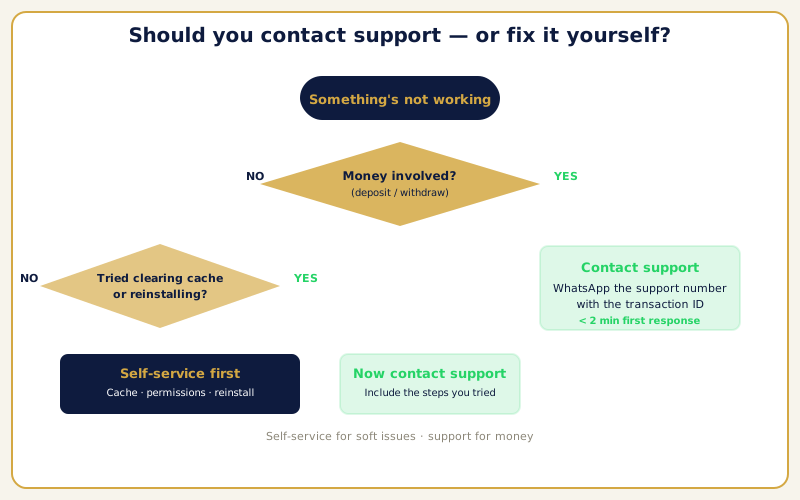
Should You Contact Support or Fix It Yourself?
Some issues resolve faster with a self-service fix than by waiting for an agent. This decision guide helps you pick the right path.
| Your Issue | Try Self-Service First | Contact Support |
|---|---|---|
| Deposit debited but not in wallet | Wait 30 minutes for auto-reconciliation | If still missing after 30 minutes |
| Page does not load | Switch to mirror link or APK | If no mirror link works |
| Wrong password error | Clear saved credentials, type manually | If manual entry still fails |
| App crashes on launch | Clear cache, reinstall latest APK | If crash persists after reinstall |
| Balance not updating | Log out and back in | If still wrong after 10 minutes |
| Push notifications missing | Check app + system notification settings | If settings are correct but no alerts |
| Withdrawal delayed | Check name match, wait 90 minutes | If pending beyond 90 minutes |
| Account locked | Wait a few minutes, retry | If lock does not clear on retry |
| Bet settlement question | — | Always contact support |
| Password or username forgotten | — | Always contact support |
<!– IMAGE: Decision flowchart showing when to self-service versus when to contact support | Alt: Self-service versus contact support decision guide for common issues –>
Issues You Can Fix Without Contacting Support
Not every problem requires an agent. Several of the most common issues have self-service fixes that take less time than typing a message.
Deposit Debited but Not Credited
- Wait at least thirty minutes — the system automatically reconciles pending transactions during this window.
- Check your wallet balance again after the reconciliation period.
- Most discrepancies resolve themselves without any intervention. Only contact support if the funds are still missing after thirty minutes.
Cannot Log In — Page Does Not Load
- Confirm the issue is an ISP-level domain block — this is the most likely cause.
- Switch to the latest mirror link from the official WhatsApp channel.
- Alternatively, open the Lotus365 app if you have it installed — the APK bypasses DNS blocks entirely.
Cannot Log In — Wrong Password
- Clear saved credentials in your browser or app.
- Type your username and password manually — usernames are case-sensitive.
- Check for invisible trailing spaces if you copied from WhatsApp.
App Crashes on Launch
- Clear the app cache: Settings → Apps → Lotus365 → Storage → Clear Cache.
- If the crash continues, uninstall and reinstall the latest APK from the official site.
- Outdated builds frequently conflict with server-side updates — always use the newest version.
Balance Not Updating
- Log out and log back in to force a balance refresh.
- Wait up to ten minutes if a slight sync delay has occurred between the payment system and your wallet display.
- Contact support only if the discrepancy persists after ten minutes.
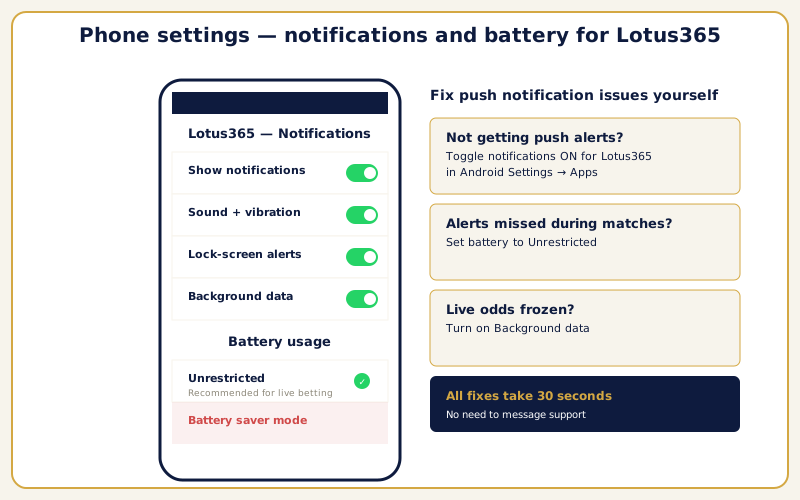
Push Notifications Not Arriving
- Check the app’s internal notification settings — toggle alerts on for the categories you want.
- Check your phone’s system notification settings for the Lotus365 app.
- On MIUI, ColorOS, and One UI devices, disable battery optimisation for the app to allow background alerts through.
<!– IMAGE: Mobile phone showing notification and battery settings for the Lotus365 app | Alt: Configuring push notification settings for Lotus365 on Android –>
How Escalation Works
The Lotus365 customer support system has a structured escalation path that ensures no issue gets stuck at a level that cannot resolve it.
Every conversation starts with a first-level agent who handles the majority of queries directly. These agents have the tools and permissions to process password resets, trace transactions, explain bet settlements, and guide troubleshooting.
If the first-level agent cannot resolve your problem — because it requires higher permissions, involves a policy exception, or needs backend investigation — the conversation is escalated to a senior agent. The senior agent has broader system access and authority to approve actions that first-level agents cannot.
In rare cases involving complex disputes, significant account security concerns, or platform-level technical faults, the matter can be further escalated to a department lead. Throughout this entire chain, you stay in the same WhatsApp conversation. You never need to re-explain your issue — the escalation team has full visibility into the conversation history from the first message onward.
Each tier has a defined scope and timeline. Most escalated issues are resolved within the same day, and the agent handling your case provides status updates proactively.
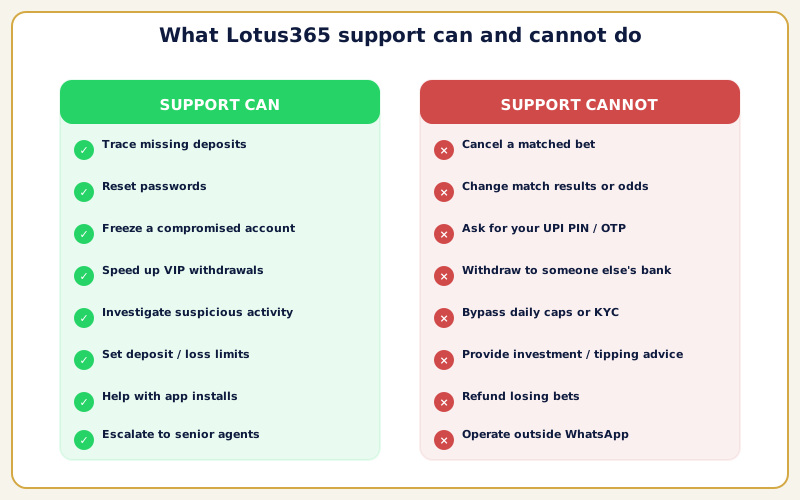
What Support Cannot Do
Some requests fall outside the scope of what any agent can assist with. Knowing these boundaries upfront saves time.
- Betting advice or predictions. Agents will not recommend which teams to back, which markets offer value, or what strategies to use. Betting decisions are your responsibility, and the platform maintains strict neutrality.
- Reversing settled bets. Once a market settles according to published rules, the outcome is final. Agents can explain the ruling in detail, but they cannot change the result. If you believe a factual error occurred, you can request a formal review — but the rules as published at bet placement time govern the outcome.
- Overriding third-party payment policies. If your bank declines a transaction or your UPI app imposes a limit, support can suggest alternative methods but cannot override restrictions imposed by external providers.
- Disclosing other users’ information. Privacy policies prevent agents from sharing any account details belonging to other users, regardless of the circumstances.
- Legal or tax guidance. Agents can help you access your full transaction history for record-keeping, but they cannot advise on tax obligations, legal status, or regulatory questions related to online betting in your state or territory.
<!– IMAGE: Infographic summarising what support can and cannot assist with | Alt: Scope of Lotus365 customer support showing covered and excluded request types –>
Ready to get help? Message the support team on WhatsApp. If you do not have an account yet, creating a Lotus365 ID takes under sixty seconds, and the same WhatsApp channel handles both registration and ongoing support.
For mental health support and resources related to gambling concerns in India, NIMHANS in Bengaluru is a leading government facility for behavioural addiction treatment. A broader directory of Indian helplines covering gambling, mental health, and crisis support is available through Find A Helpline.
FAQ
How do I contact Lotus365 customer support?
The fastest way is through the official WhatsApp channel. The support number is displayed on the Lotus365 website. Send a message any time — Lotus365 customer support is available twenty-four hours a day, seven days a week, including holidays.
What languages does support offer?
Agents communicate in both Hindi and English. Write your message in whichever language you are more comfortable with, and the agent responds in the same language.
How quickly will I get a response?
Urgent issues — deposits, withdrawals, account lockouts — receive a first response in under two minutes. High-priority queries like password resets are answered within five minutes. General questions are addressed within ten to fifteen minutes.
Can support help if my deposit did not arrive?
Yes. Financial agents can trace your deposit through the processing system. Provide your username, the deposit amount, the time of the transaction, and a screenshot from your banking app. Most deposit discrepancies are resolved within fifteen to thirty minutes.
What should I do if my withdrawal is delayed?
Check the standard processing time for your withdrawal method first. If the expected window has passed, message support with your username and withdrawal details. The agent checks the processing pipeline and provides a status update.
How does password recovery work?
Message support on WhatsApp, verify your identity by confirming your username and registered phone number, and receive new temporary credentials in the chat. Log in and change the temporary password immediately. The process typically takes five to ten minutes.
Is there an email address for support?
No. Lotus365 does not operate a separate email support channel. WhatsApp is the sole contact method, chosen because it provides faster, more interactive assistance than email allows.
Can support help with app problems?
Yes. Technical agents can assist with installation issues, crashes, loading errors, and display problems. When reporting an app issue, include your device model, Android version, and what happens when the problem occurs. Screenshots sent directly in WhatsApp are extremely helpful.
What happens if the first agent cannot solve my issue?
The conversation is escalated to a senior agent with broader access and authority. If needed, it can go further to a department lead. You stay in the same WhatsApp thread throughout — no re-explaining required.
Can I contact support before creating an account?
Yes. You do not need an existing account to message support. Agents are happy to answer questions about the platform, available features, deposit methods, and the registration process before you sign up.
Does support operate during IPL matches?
Yes. The team actually increases staffing during major events to handle higher query volumes. Urgent financial and access issues maintain their under-two-minute response target even during peak match periods.
Can support reverse a bet I placed by mistake?
Once a bet is confirmed and matched on the exchange, it cannot be reversed. If the market is still active, you may be able to place an offsetting bet to limit your exposure, but support cannot cancel a confirmed wager. Always double-check your bet slip before confirming.
How do I report suspicious activity on my account?
Message support immediately and state that you suspect unauthorised access. The agent can freeze your account to prevent further activity while the security team investigates. Any unauthorised transactions identified during the review are flagged for reversal consideration.
What information should I include in my first message?
Always include your Lotus365 username. For payment issues, add the transaction amount, approximate time, and method used. For technical problems, include your device model and a screenshot if possible.
Can support help me set betting limits?
Yes. If you want to set deposit limits, loss limits, or take a temporary break from betting, message support and request the change. The agent configures the restrictions on your account. These responsible gambling tools are available to all users at any time.