
Moving money in and out of your betting account should never be the hard part. Lotus365 payment methods are built around the channels Indian users already rely on — UPI, PhonePe, Google Pay, Paytm, IMPS, and net banking — with zero transaction fees, a ₹100 minimum deposit, and withdrawal processing that puts funds back in your bank account within the hour.
This page walks through every available deposit and withdrawal option, step-by-step flows for both directions, VIP payout benefits, the security infrastructure protecting your transactions, and quick fixes for the most common payment hiccups.
Every Payment Option Compared
Choosing the right channel for your Lotus365 payment depends on what you prioritise — speed, convenience, or transaction size. The table below lays out every supported method with the details that actually matter when you are trying to fund a bet before the next over starts.
| Method | Deposit Speed | Withdrawal Speed | Min Deposit | Fee | Availability |
|---|---|---|---|---|---|
| UPI (Generic) | Under 30 seconds | 15–45 minutes | ₹100 | Free | 24/7 |
| Google Pay | Under 30 seconds | 15–45 minutes | ₹100 | Free | 24/7 |
| PhonePe | Under 30 seconds | 15–45 minutes | ₹100 | Free | 24/7 |
| Paytm | Under 30 seconds | 15–45 minutes | ₹100 | Free | 24/7 |
| IMPS | 1–5 minutes | 30–60 minutes | ₹100 | Free | 24/7 |
| NEFT | 5–15 minutes | 30–60 minutes | ₹100 | Free | Banking hours |
| Net Banking | 2–10 minutes | 30–60 minutes | ₹100 | Free | Bank dependent |
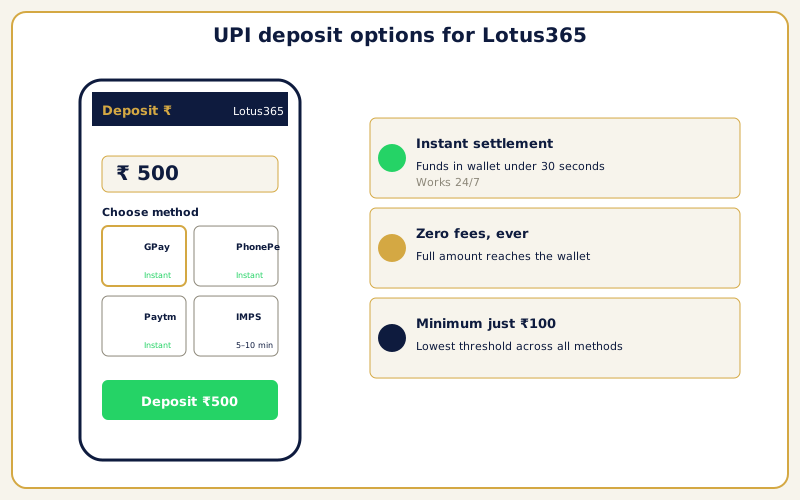
UPI is the clear default for most Indian users. The transaction completes in under thirty seconds, works at any hour including holidays, and requires nothing beyond your smartphone and a linked bank account. Google Pay, PhonePe, and Paytm all run on the same NPCI-managed UPI infrastructure, so the underlying speed is identical — pick whichever app you already have configured.
IMPS is the strongest alternative for users who prefer direct bank-to-bank transfers. It operates around the clock and settles in under five minutes for most banks. NEFT is reliable but batched during banking hours, which can introduce delays on weekends or late at night.
Net banking works with all major Indian banks — SBI, HDFC, ICICI, Axis, Kotak Mahindra, and dozens of others. You are redirected to your bank’s secure portal, authorise the payment with your existing credentials and OTP, and the transfer initiates immediately.
The most important line in the table is the fee column: every entry reads free. The full amount you deposit lands in your wallet, and the full amount you withdraw reaches your bank. No processing charges, no hidden deductions, no conversion fees. <!– IMAGE: UPI payment apps (Google Pay, PhonePe, Paytm) on a mobile screen with the Lotus365 deposit panel | Alt: Lotus365 payment methods showing UPI deposit options on mobile –>
Which Method Fits Your Situation
Different scenarios call for different payment channels. This quick-reference guide matches common situations to the best method.
| Your Situation | Best Method | Why |
|---|---|---|
| Fastest possible deposit before a live match | UPI (any app) | Under 30 seconds, works 24/7 |
| Large deposit above UPI daily limit | Net Banking or IMPS | Higher per-transaction thresholds set by your bank |
| Late-night or holiday deposit | UPI or IMPS | Both operate 24/7 without batch delays |
| First-time deposit with ₹100 | UPI via Google Pay or PhonePe | Instant, zero friction, no minimum friction |
| Withdrawal speed is top priority | UPI payout | Fastest settlement once platform releases funds |
| Your bank’s UPI is temporarily down | IMPS | Bypasses UPI infrastructure entirely |
| You prefer desktop banking | Net Banking | Full browser flow through your bank’s portal |
How to Deposit Step by Step
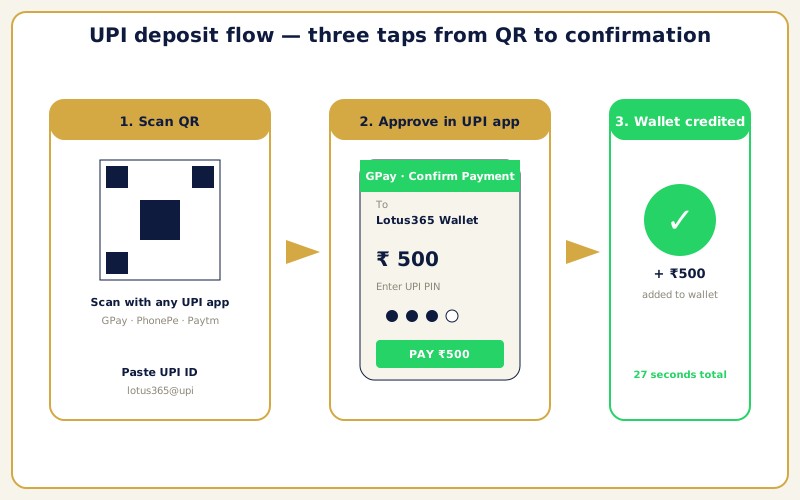
Funding your Lotus365 payment wallet takes less than two minutes regardless of which method you choose. The flow is designed to minimise taps so you can get back to the markets quickly.
UPI Deposit Flow
- Log in to your account through the browser or Lotus365 app. If you do not have an account yet, create a Lotus365 ID via WhatsApp first.
- Open the cashier from the top navigation bar or dashboard. The deposit panel appears immediately.
- Select UPI as your payment method and enter the amount. The minimum is ₹100 — type your desired figure or tap a preset quick-deposit button.
- Complete the payment by scanning the QR code with your UPI app or approving the payment request pushed to your phone. Enter your UPI PIN to confirm.
- Funds arrive instantly. A confirmation notification appears on screen within seconds. Your wallet balance updates in real time and you can start placing bets immediately.
The UPI path is the fastest because the entire settlement happens within the UPI ecosystem. Your bank debits the amount, NPCI routes it to the platform’s payment aggregator, and the wallet credits — all in a single automated chain with no manual intervention. <!– IMAGE: Step-by-step UPI deposit flow showing QR code scan and wallet confirmation | Alt: UPI deposit process on Lotus365 showing payment confirmation –>
Bank Transfer Deposit Flow
- Open the cashier and select bank transfer (IMPS or NEFT) as your method.
- Copy the generated beneficiary account number and transaction reference provided by the platform.
- Paste these details into your banking app and initiate the transfer.
- The system automatically matches the incoming payment to your account. IMPS deposits typically settle in under five minutes. NEFT can take up to fifteen minutes depending on your bank’s batch schedule.
- Funds appear in your wallet with a confirmation message once matched.
No KYC documents are required for deposits at any level. You do not need to upload Aadhaar, PAN, or any identification before funding your account.
How to Withdraw Your Winnings
Cashing out through the Lotus365 payment system follows a straightforward process designed to get your money into your bank account as quickly as possible.
- Navigate to the withdrawal section from your account dashboard. Select the withdrawal tab in the cashier panel.
- Choose your payout destination. Select between a direct bank transfer or a UPI payout. First-time withdrawals require you to add your bank details or UPI ID — this is a one-time setup.
- Enter the amount you want to withdraw. Daily limits apply based on your account tier. The interface shows your available balance and remaining daily allowance.
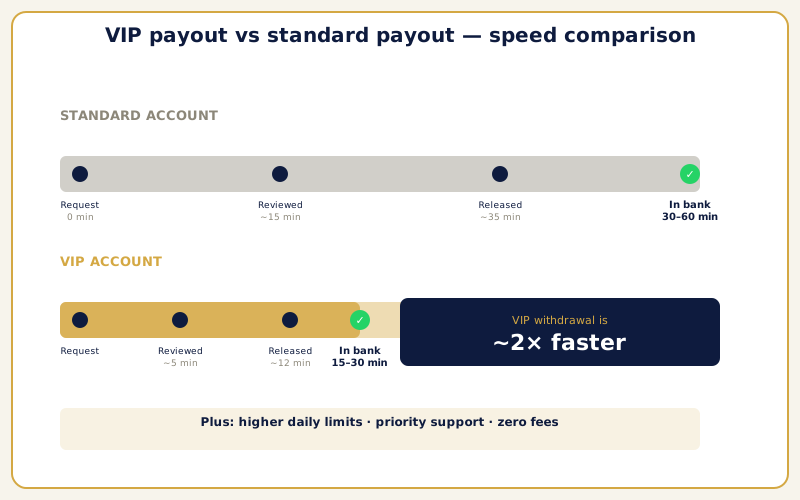
- Submit and wait. The platform queues your request for processing. Standard accounts receive funds within thirty to sixty minutes. VIP accounts benefit from priority processing at fifteen to thirty minutes.
Withdrawal funds go directly to your linked bank account or UPI address. There are no intermediary e-wallets, no conversion steps, and no fees at any tier. The amount you request is the amount that arrives.
What Happens Behind the Scenes
Every withdrawal passes through a brief automated review that checks your account standing and confirms the payout details match your registered information. For the vast majority of transactions, this review completes in seconds.
UPI withdrawals tend to arrive faster than bank transfers because UPI settlements are near-instant once the platform releases the funds. IMPS and NEFT payouts depend on your bank’s incoming credit processing speed.
If a withdrawal is rejected, the most common cause is a name mismatch between your Lotus365 account and your bank account. Ensuring these match during your initial payout setup prevents delays down the line.
VIP Payout Advantages
High-activity users who qualify for VIP status unlock tangible improvements in the Lotus365 payment experience. The VIP programme delivers measurable differences in how your money moves.
- Faster processing — VIP withdrawals complete in fifteen to thirty minutes, compared to thirty to sixty for standard accounts. A dedicated processing queue ensures VIP requests jump ahead, which matters most during peak betting windows.
- Higher daily limits — Withdraw larger amounts per day. Especially valuable after a big win on cricket betting markets or a successful accumulator run.
- Priority support — Any payment-related query from a VIP account is handled by a dedicated agent with faster response targets. Resolution paths are shorter and more direct.
- Streamlined verification — Verified VIP accounts skip the standard automated review step on withdrawals, shaving additional minutes off each payout.
VIP qualification is automatic. The platform tracks your cumulative betting activity and deposit volume, and once you cross the threshold, VIP perks activate without any application or manual request. Zero additional fees apply at the VIP level. <!– IMAGE: VIP payout timeline comparison showing standard versus priority processing speeds | Alt: Standard versus VIP withdrawal processing times on Lotus365 –>
Securing Every Transaction
Every Lotus365 payment transaction is wrapped in multiple layers of protection engineered to keep your money and data safe.
- 256-bit SSL encryption shields all communication between your device and the platform. This is the same encryption standard that major Indian banks deploy for internet banking and UPI transactions.
- Certified UPI integration means the platform’s payment gateway operates through aggregators regulated by the RBI. Your UPI PIN is never stored, processed, or visible to the platform at any stage.
- Automated fraud detection monitors transaction patterns using machine learning algorithms. Unusual activity triggers an additional verification step before the transaction proceeds.
- Data isolation keeps financial information in encrypted, segregated databases. Support agents cannot view your full bank details during a conversation. Payment data is never shared with third parties.
- Two-factor authentication adds an optional but strongly recommended second layer. With 2FA enabled, even a compromised password is not enough to authorise a withdrawal.
The combined effect is a payment environment where you can deposit before a match and withdraw after it with confidence that your money is protected at every step.
Fixing Common Payment Problems
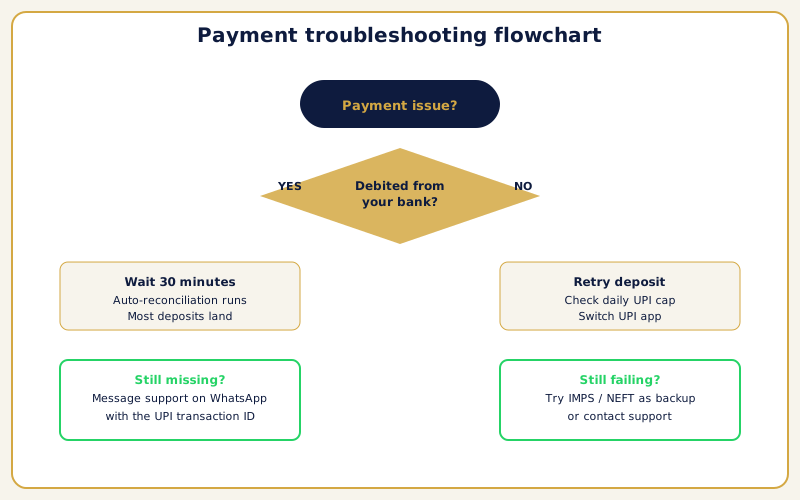
The Lotus365 payment system is built for reliability, but occasional issues crop up — usually on the banking side rather than the platform itself. <!– IMAGE: Troubleshooting flowchart showing common payment issue resolution paths | Alt: Payment troubleshooting guide for deposit and withdrawal issues –>
UPI Payment Declined or Timed Out
- Check whether your UPI app responded within the payment window — timeouts are the most frequent cause.
- Verify you have not hit your daily UPI transaction limit.
- Switch to a different UPI app — move from Google Pay to PhonePe, for example — or wait fifteen minutes and retry.
- If the amount was debited from your bank but not credited to your wallet, do not panic. The system reconciles pending transactions automatically within thirty minutes.
- If it still has not appeared after that window, contact support with a screenshot of the bank debit.
Bank Transfer Not Reflecting
- Verify that you used the correct beneficiary details and reference number provided by the platform.
- Allow up to thirty minutes during high-traffic banking periods — NEFT and IMPS transfers can occasionally take longer than expected.
- If the transfer has not credited within thirty minutes, message support with your bank transaction receipt. The team can trace the payment and manually reconcile it.
Withdrawal Pending Beyond Expected Time
- Check that the name on your Lotus365 account matches the name on your bank account exactly — mismatched names are the single most common cause of delayed payouts.
- Wait up to ninety minutes for the automated security review to complete — most delays stem from additional verification triggered by the system.
- If still pending beyond ninety minutes, contact support with your withdrawal details for manual investigation.
Balance Not Updating After Deposit
- Log out and log back in to refresh your balance.
- If the discrepancy persists after ten minutes, send your deposit receipt to support for manual resolution.
Daily Limit Reached
- Wait for the next daily cycle — both deposits and withdrawals reset at midnight.
- VIP users have substantially higher thresholds. Qualifying for VIP status is the most effective long-term solution if you regularly approach standard caps.
Tips for Faster Transactions
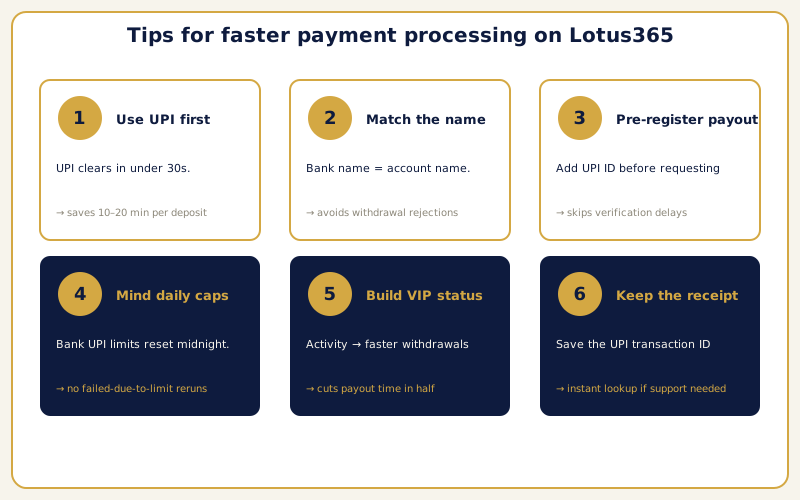
Experienced users follow a few practical habits that keep deposits and withdrawals running at peak speed.
- Default to UPI for deposits. It is the fastest method — under thirty seconds in most cases. Keep your preferred UPI app updated and ensure your linked bank account has sufficient funds before initiating.
- Match your names exactly. The name on your Lotus365 account should be identical to the name on your bank account. Even small discrepancies — a middle initial present in one but missing from the other — can trigger verification flags that slow withdrawals.
- Enable 2FA early. Accounts with two-factor authentication enabled receive fewer security holds on withdrawals because the platform can verify request legitimacy with higher confidence.
- Avoid NEFT during off-hours. NEFT processes in batches during banking hours. If speed matters, choose IMPS or UPI instead — both operate around the clock without batch delays.
- Clear pending transactions first. If you have a deposit or withdrawal still processing, wait for it to complete before initiating another. Overlapping transactions can trigger automated security reviews.
- Use the app for mobile payments. The integrated UPI flow within the Lotus365 app is smoother than the mobile browser experience. Fewer redirects mean faster completion and fewer timeout errors.
- Keep your UPI app current. Outdated versions of Google Pay, PhonePe, or Paytm cause transaction failures more often than any other single factor. Enable auto-updates on your phone.
<!– IMAGE: Checklist graphic showing best practices for fast deposits and withdrawals | Alt: Tips for faster payment processing on Lotus365 –>
For an overview of the full platform and everything your account gives you access to, visit the Lotus365 homepage. If you need to log in, the login page gets you in within seconds once you have your credentials.
For information on digital payment infrastructure and consumer protection in India, visit the Digital India initiative. Resources on financial literacy and safe transaction practices are available through the National Centre for Financial Education.
FAQ
What is the minimum deposit on Lotus365?
The minimum deposit across all Lotus365 payment methods is ₹100. This applies equally to UPI, Google Pay, PhonePe, Paytm, IMPS, NEFT, and net banking. There is no separate minimum for different channels.
Does Lotus365 charge fees on deposits or withdrawals?
No. Every deposit and every withdrawal is completely free of charge. The platform does not apply processing fees, service charges, or hidden deductions. The full amount you send reaches your wallet, and the full amount you withdraw arrives in your bank account.
How fast are UPI deposits?
UPI deposits are instant — typically under thirty seconds from the moment you approve the payment with your UPI PIN. This speed applies to Google Pay, PhonePe, Paytm, and any other UPI-enabled banking app. UPI works twenty-four hours a day, including weekends and bank holidays.
How long do withdrawals take?
Standard account withdrawals are processed within thirty to sixty minutes. VIP account holders receive priority processing with payouts completing in fifteen to thirty minutes. Funds go directly to your registered bank account or UPI address.
Do I need KYC documents to deposit money?
No. KYC verification is not required for deposits on Lotus365. You can fund your account immediately after creating your ID and start placing bets right away. Basic verification may be required for withdrawals above certain thresholds.
Which UPI apps work for deposits?
All major UPI applications are supported — Google Pay, PhonePe, Paytm, BHIM, Amazon Pay, and bank-specific UPI apps from SBI, HDFC, ICICI, and others. Any app connected to the NPCI UPI infrastructure will work.
Where do withdrawal funds go?
Withdrawals are sent directly to your linked bank account or UPI address. No intermediary e-wallets or payment processors are involved. You register your payout destination once, and all future withdrawals are routed there automatically.
What happens if my deposit was debited but not credited?
Wait at least thirty minutes — the system automatically reconciles pending transactions during this period. If the funds still have not appeared, contact the support team with your bank transaction receipt or UPI transaction ID. Most discrepancies are resolved within one interaction.
Are there daily limits on transactions?
Yes. Both deposits and withdrawals have daily caps that depend on your account tier. Standard accounts have a baseline daily limit, while VIP accounts enjoy significantly higher thresholds. Your bank or UPI app may also impose its own independent transaction limits.
How do I qualify for VIP withdrawal benefits?
VIP status is awarded automatically based on cumulative betting activity and deposit history. The platform tracks your engagement, and once you meet the qualifying criteria, VIP perks — faster processing, higher limits, priority support — activate without any manual application.
Can I use different payment methods for deposits and withdrawals?
You can deposit through any supported method, but withdrawals are tied to the bank account or UPI address registered on your account. This restriction exists for security — it prevents funds from being sent to a destination that does not belong to the account holder.
Is my financial data safe on Lotus365?
Yes. The platform uses 256-bit SSL encryption, stores financial data in segregated encrypted databases, integrates with RBI-regulated payment gateways, and employs automated fraud detection. Your UPI PIN and bank passwords are never stored or processed by the platform. Optional two-factor authentication provides an additional security layer.
What should I do if my withdrawal is rejected?
The most common reason for rejection is a mismatch between your Lotus365 account name and your bank account name. Verify that both match exactly, correct any discrepancies in your account settings, and resubmit. If the issue persists, contact support with your withdrawal request details for manual review.